June 9th, 2026

π¨ Digital Products: Better File Management, Delivery & Reliability
We've made a series of improvements to how digital products work in PuppetVendors, from file management to delivery reliability.
Preview and Download Files
Vendors can now click on any uploaded digital file to view or download it directly from the product form. No more guessing whether the right file was uploaded.
Upload Progress
Uploading digital files now shows a dedicated progress panel with the file name, a progress bar with a percentage, and a cancel button. When uploading multiple files at once, each file shows its own status so vendors always know exactly where things stand.
Cleaner Product Forms
The digital files section now only appears on products that are marked as digital. If you're selling physical products, the form stays clean and simple with no unnecessary sections getting in the way.
Customers can place a single order that includes both physical and digital products. Physical items follow your normal fulfillment process, while digital files are delivered automatically. No workarounds needed, no separate checkouts.
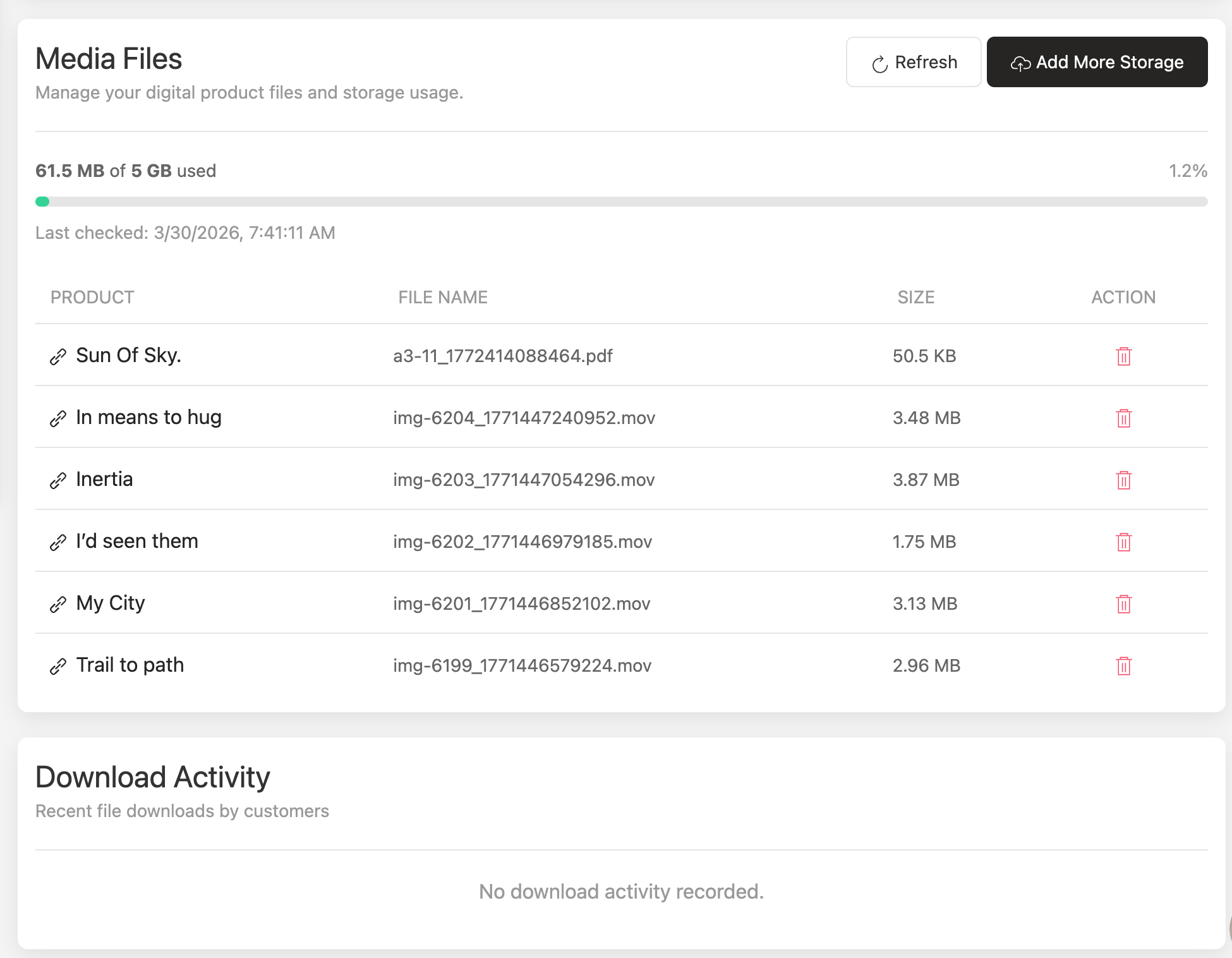
You can now see exactly who downloaded what and when. A new download tracking section shows the customer email, order number, file name, and download time for every digital file. This gives you full visibility into how your digital products are being accessed after purchase.
We've improved digital product delivery to work more consistently across all store configurations. Your customers will receive their digital files reliably, every time.
File downloads are also more dependable, with improvements that prevent rare cases where download links could stop working after a product update.
These updates are live now. No action needed on your end. If you sell digital products, your vendors and customers are already benefiting from these improvements.
May 26th, 2026

The Problem
Managing commissions across different products, vendors, and order types has meant juggling manual overrides and separate settings. As your marketplace grows, this gets harder to manage.
Whatβs New
Commission Rules let you set up flexible rules that automatically calculate the right commission for every order. No more manual work.
How It Works
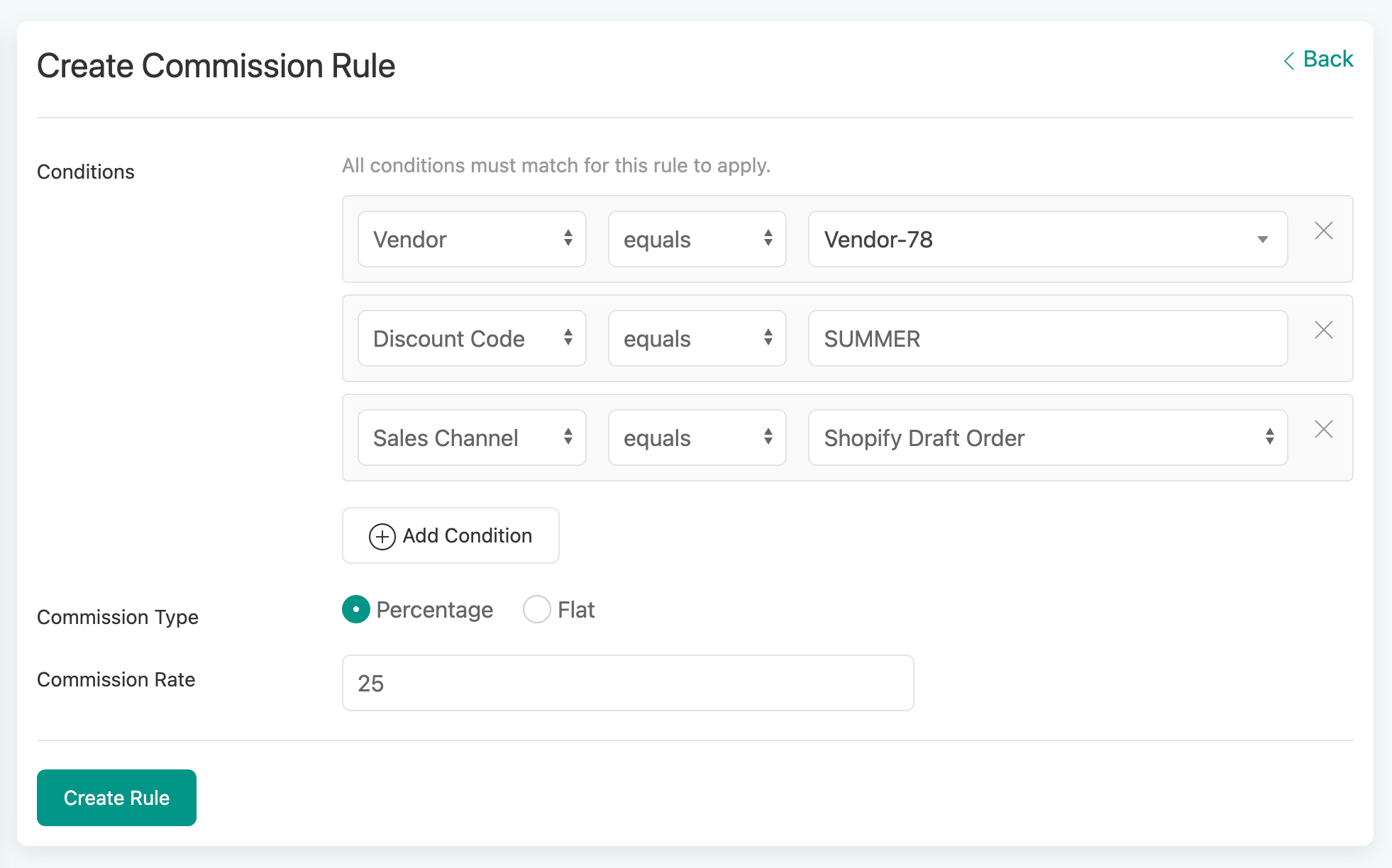
Pick your conditions
Choose from 10+ fields to build your rule:
Product name, SKU, variant, product type, or tags
Discount code, payment method, or sales channel
Vendor, shipping method or location based sales
Custom tags, order tags, or currency/markets
Item price, quantity, or weight
Mix and match as many conditions as you need. For example: βIf the discount code is SUMMER AND the Sales Channel is Point Of Sale, apply 12% commission.β
Set your commission
Choose a percentage (e.g.: 15%) or a flat fee (e.g.: $4.00) for each rule.
Let the system handle conflicts
When more than one rule matches an order, the highest commission automatically wins. No guesswork, no manual sorting.
Test Before You Go Live
Not sure which rule will match? Enter sample order details in the built-in testing panel and instantly see which rule applies. Fine-tune your setup with confidence before it goes live.
Already Have Commission Set Up?
If youβre using per-SKU or per-Product type commissions today, those automatically continue to match if no new rule matches.
A Few Extras
Rule names are auto-generated for you (and editable)
You'll see a warning if the same product is covered by multiple rules
Each rule shows how many products it affects at a glance. Ready to try it? Head to Settings > Commission Rules to set up your first rule. If you do not see it, ask our support team.
Ready to try it? Head to Settings β Commission Rules to set up your first rule.
May 13th, 2026
New
Improved

Required Product Form Fields
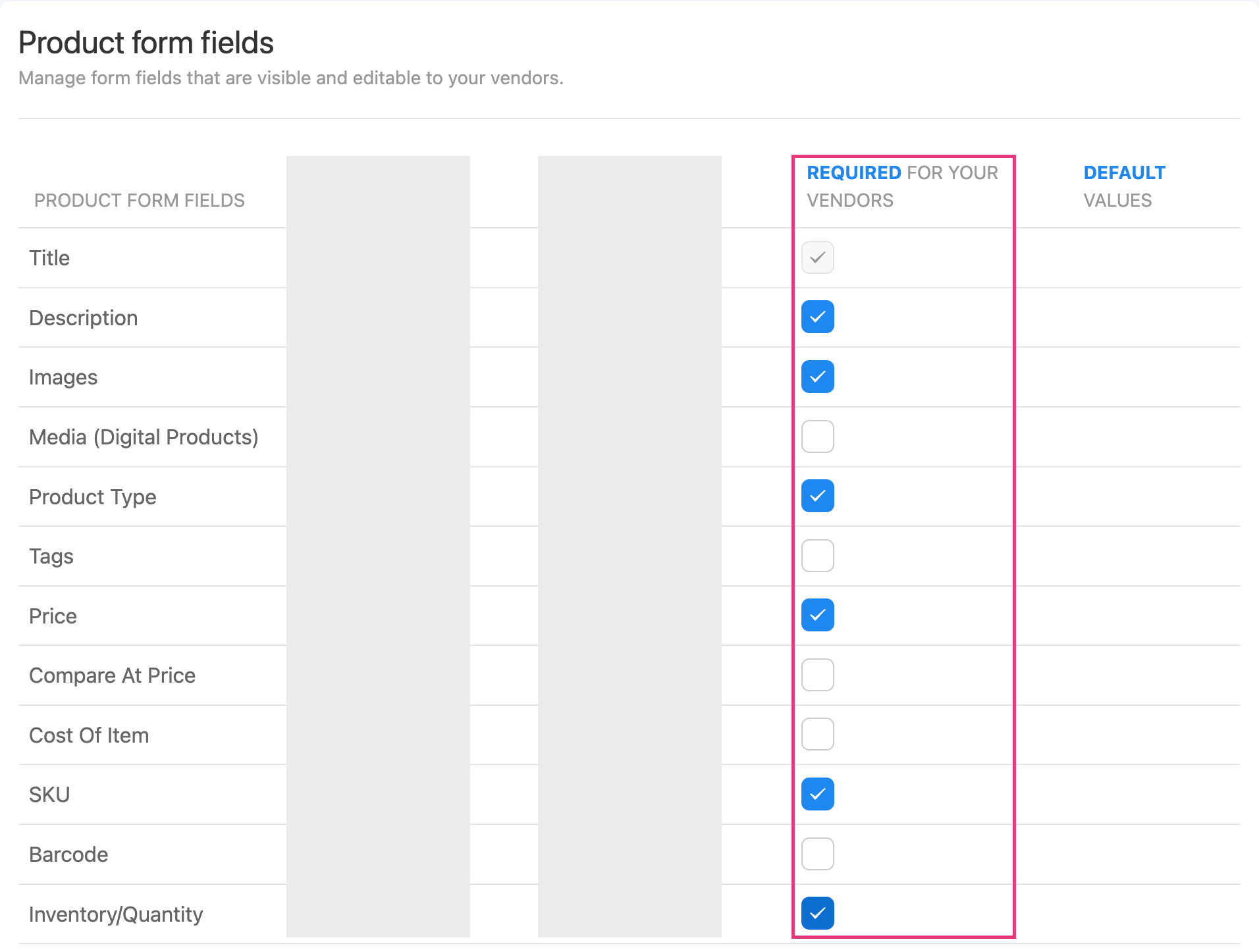
You can now choose which product fields your vendors must fill in before saving. This includes description, images, price, SKU, barcode, inventory, weight, and more.
This gives you full control over product data quality across your marketplace. No more chasing vendors to complete missing information.
Head to Settings β Products β Metafields to set it up.
Order Notes Visibility Control
A new toggle in Advanced Visibility Control lets you show or hide order notes from your vendor portal and packing slips.
When you have order notes that are only relevant to your internal team, simply toggle them off. Vendors wonβt see them, and your pages load faster too.
Zebra Barcode Printing - Barcode labels now print crisper and more legible on Zebra thermal printers, with improved text sizing across label formats.
Multi-Language CSV Exports - Exported CSV files now display special characters correctly in Excel and Google Sheets. Great for stores with product names or vendor details in languages like Vietnamese, Chinese, Arabic, and more.
Automated Reporting Delivery Retry - If a scheduled vendor report fails to send, the system now automatically detects it and resends the next day.
Security: Vendor signup forms now include stronger protection against automated bot registrations.
March 24th, 2026

Introducing: Shopify POS Widget for PuppetVendors
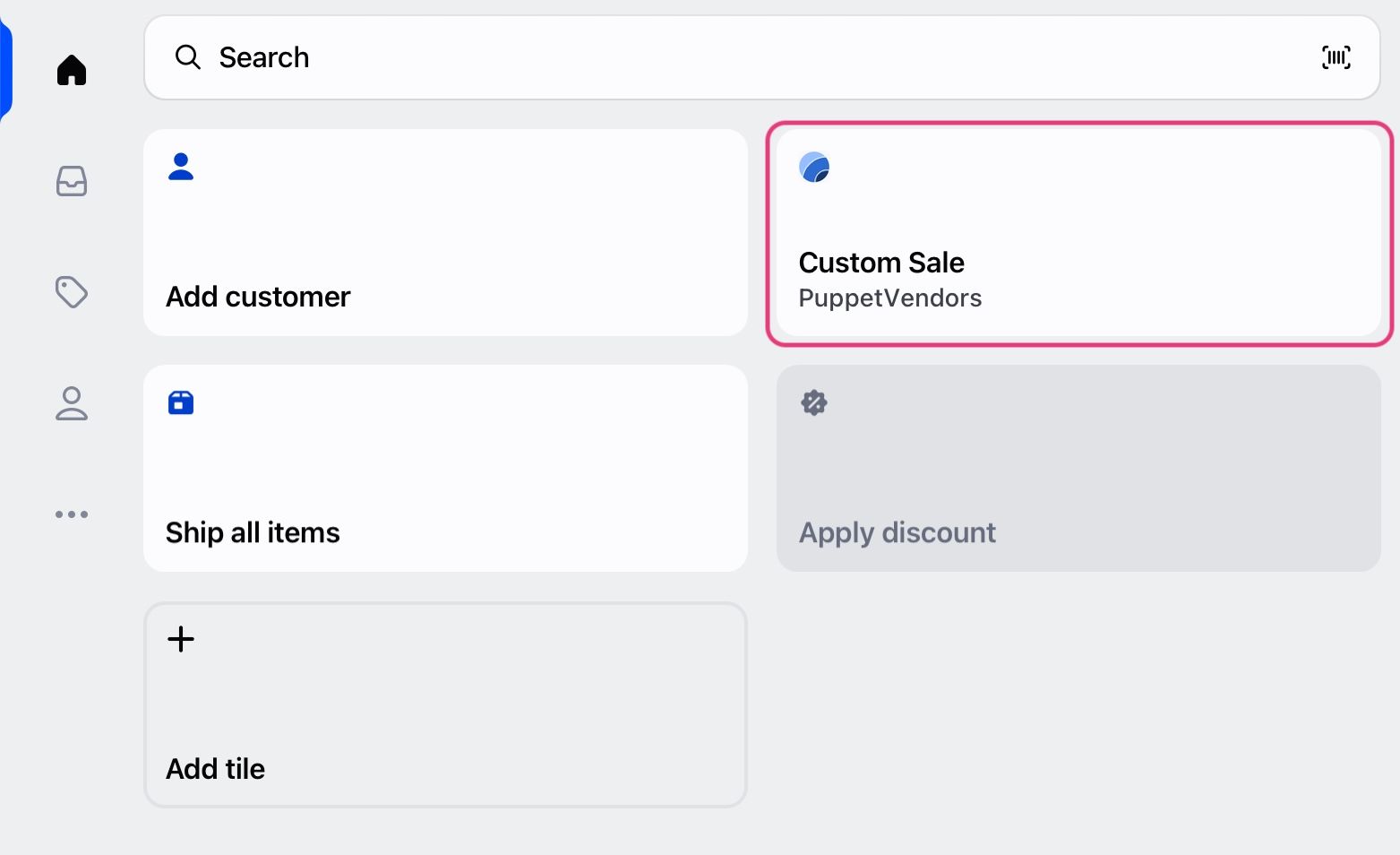
You can now create custom sales in Shopify POS and assign commissions to vendors at checkout. No manual work. No clean up later.
What this means:
Commissions are tracked at the point of sale
No spreadsheets or post-sale fixes
Accurate payouts every time
Built for:
Consignment stores
Antique malls
Multi-vendor retail spaces
π Setup guide: https://help.puppetvendors.com/en/article/how-to-activate-and-use-puppetvendors-custom-sale-shopify-pos-widget-62wp8m/
We upgraded barcode tools to support real retail use.
Faster label creation
Better scanning reliability
Works well for high-volume stores
We improved support for international shipping through Shippo.
More reliable rate calculation
Better handling of cross-border shipments
Smoother experience for global stores
Selecting payout items is now simpler.
Use checkboxes to select items quickly
Reduce manual errors
Faster payout workflows
February 24th, 2026

Shipping and Refunds Policy in the vendor banner

Vendors can now display their own return and shipping policies directly in your storefront β detailing timeframes, costs, damage procedures, etc. This helps ensure transparency with customers and lets vendors set expectations. Store owners are encouraged to check vendor policies for consistency with overlapping store policy to avoid conflicts.
How it helps merchants
Greater transparency gains more customer trust
Gives clarity to customers as clear policies help avoid misunderstandings, returns and disputes
Better policy alignment
Improved shopper experience
Merchants can also set up the standard naming convention directly within Shopify
To learn more about how to set this up, please click here for the help document:
Verify white-label domain set-up
Verification ensures that your domain points correctly and loads securely.
To ensure everything is connected correctly alongside your white-label feature, youβll need to verify your custom domain within the platform. Verification confirms that your DNS records are properly set and that your domain is secure, preventing issues such as broken links, login errors, or SSL problems.

Required Metafields and re-arrangement
Weβve enhanced the Product Metafields configuration to give merchants greater control and flexibility. You can now define which metafields are visible and required at the product level. Additionally, metafield ordering has been optimizedβfields can now be rearranged via drag-and-drop, allowing for faster customization.

Here is the link to learn more about Product Metafields.
Improvements and Bug Fixes
Mandatory fields - allows full control for merchants over product form fields
Improvement to visibility control settings documents download
Improvements to product approval processes that allows for larger number of approvals at the same time
Digital products delivery improvements via theme extensions - Customer download link are now on both βThank youβ and βOrder Statusβ pages
February 16th, 2026

Charge your vendors a monthly subscription fee to sell on your marketplace - fully no-code and natively integrated with Stripe.
What's new:
Create subscription plans with custom pricing tiers (e.g. Starter, Pro, Enterprise). Create upto 5 plans.
Set different commission rates per plan
Control catalog growth with product upload limits per tier
Automatic billing through Stripe - no manual invoicing
Vendors self-serve their subscription from the vendor portal
Why it matters:
Subscriptions give you stable, recurring revenue independent of sales volume. Early-stage marketplaces can monetize from day one instead of relying solely on commissions. Established marketplaces get better vendor tiering and predictable income.
How to get started:
Enable vendor subscriptions from your PuppetVendors dashboard under Settings or reach out to support to get activated.
November 10th, 2025

Creating compelling product listings just got 25% faster.
Weβre excited to introduce AI Product Descriptions β a game-changing feature that helps your vendors and team generate polished, persuasive product copy in seconds.
π§ Just click βGenerate with AIβ and let our AI do the creative heavy lifting.
ποΈ Each description is tailored to highlight the productβs value, tone, and appeal β instantly.
π Say goodbye to blank text boxes and hello to faster product launches.
Whether youβre adding new SKUs or onboarding multiple vendors, this update makes the product creation workflow smoother, faster, and more professional than ever.
Elevate your listings. Engage your customers. Let AI do the writing.
Other Improvements
Prevent duplicate vendor account requests
Discounts and Tax engines β greater control for you
CSV exports for vendor report now consider visibility control settings
More robust bulk product approval and publishing processes
Vendors now have more control over confirming orders via order cancellations
Additional security to prevent spam on signup pages - reach out to activate
Support for the Vietnamese language
September 8th, 2025
New
Improved

What it does
Set availability easily
Vendors can activate Vacation Mode when they need time off, ensuring no new orders come in during their break.
Auto-hide listings
Products are put to Draft mode instantly once turned on, preventing accidental sales.
Quick restoration
Listings reappear as soon as vendors return, with no manual setup required.
Hands-off process
Removes the need for you or the vendors to toggle products one by one, minimizing errors.
How this helps you
Protects customer experience by avoiding delays or cancellations.
Saves you time since thereβs no action required directly on your end.
Builds trust through a consistent, reliable storefront.
Keeps your vendors engaged by giving them flexibility without added stress.
The steps to set it up and other information related to this feature can be found here.
Reach out via support to get access.

Weβve upgraded the Fulfillments tab to give you and your vendors sharper tools for order management.
Key Improvements
Statistics counters
Quick, at-a-glance view of order volumes for better tracking and monitoring.
Search by Order ID
Locate orders instantly without scrolling or guesswork.
Categorized status tabs
Orders are grouped by status for clear visibility and faster action.
How it helps you and your vendors
Saves time with faster searches and better navigation.
Improves accuracy by reducing missed or unprocessed orders.
Boosts efficiency for both you and your vendors when managing multiple transactions.
Delivers clarity with organized, easy-to-read status updates.

This feature allows you to automatically approve vendor or seller accounts when they fill out the sign-up form β no manual review needed.
What to expect:
Instant onboarding
As soon as a vendor fills out the signup form, their account becomes active automaticallyβfast access with zero delays.
Simplified admin workflow
Removes the need for manual approval steps; saves time on reviewing and approving each request.
Customizable signup page
Vendors can apply via a sign-up form that makes the opt-in for auto-approval clear and user-friendly.
This provides you, as merchants:
Faster growth opportunities with minimal intervention
Less administrative burden
Better vendor experience with scalable and automated onboarding
This help document illustrates how to set it up in detail.
June 30th, 2025
New
Improved


Your product pages just got a visual upgrade. We now support:
Variant-level image selection β Let vendors visually differentiate sizes, colors, or styles
Product video uploads β Showcase items in motion, explain features, or build trust with demo videos
This enhancement helps your sellers create richer, more professional listings that convert betterβespecially for high-consideration or visually complex products.

Admin life just got easier. You can now set commission rates per product using a simple CSV upload with drag-and-drop supportβno more one-by-one updates or over-complicated workarounds.
Perfect for:
Special items with unique commission arrangements
Seasonal adjustments
Quickly onboarding large vendor catalogs
This keeps your margins in check and admin workflows streamlined.
Set it and forget it. You can now define commission rates based on Shopify product typesβand theyβll automatically apply as vendors add or update their listings.
Why this matters:
Save time setting rates across large catalogs
Ensure consistency in commission logic
Reduce human error and edge-case overrides
Whether itβs βAccessories at 10%β or βElectronics at 15%,β your payout engine just got a lot smarter.
Find the right product fasterβnow with support for:
SKU-based search
Barcode-based search
Partial match detection
Whether youβre bulk-assigning commissions or a vendor is managing inventory, this makes navigation lightning-fast and typo-tolerant.

Let your vendors print and fulfill orders directlyβfaster and more reliably.
Now live in BETA:
Live shipping rates from Shippo and ShipStation
One-click shipping label generation
Auto-sync with Shopifyβs fulfillment status
Flexible account setup: Merchants can use their shipping accounts or allow vendors to use theirs
Support for over 100+ carriers worldwide, including major players like DHL, FedEx, UPS, USPS, Canada Post, Australia Post, plus a wide range of regional and international providers
Empower vendors to self-serve while maintaining fulfillment flow visibility across your marketplace.
Help Documents
April 24th, 2025
New
Improved
Fixed

Weβve been hard at work bringing you some powerful new features designed to help you run your multi-vendor marketplace more efficiently. Whether youβre managing physical goods, digital products, or running a consignment store, these updates are here to make things smoother, faster, and more intuitive for both you and your sellers. Letβs jump in!
π¦ Package Dimensions

Shipping just got a whole lot easier. You and your vendors can now set pre-determined package dimensions for each product. This helps streamline shipping label generation and reduces manual entry errorsβespecially handy when fulfilling a high volume of orders. Product weight are also auto-populated along with your storeβs default weight unit.
π Address Manager

Say hello to smarter shipping! Our new address manager helps ensure accurate delivery with:
Built-in address validation
Auto-complete for faster entry
Support for multiple βship-fromβ addresses
Whether managing a distributed vendor base or having consignment locations, this feature covers you.
π¬ Realtime Chat
Communicate better, faster. Our new chat feature brings real-time messaging between:
You and your sellers
Potential customers and vendors
Say goodbye to lost emails and slow follow-ups. Use chat to give product feedback, clarify order details, or even talk payoutsβall in one centralized place.
π Shipping Profile-Based Calculation
Now you can take full advantage of Shopifyβs split shipping system. Assign shipping rates to groups of products based on vendor profiles, eliminating over- or under-charging customers. Itβs a smarter way to reflect your sellersβ real shipping costs.